Intel’s latest wheeze for its CPUs is Software Defined Silicone (SDSi). The deal is that you buy the CPU at one price and then pay extra for a license to enable more stuff.
Basically, the CPU has an interface that you can access if you have an Authentication Key Certificate (AKC) and have purchased a Capability Activation Payload (CAP) code. This will then enable extra stuff that was previously disabled. Quite what the extra stuff is remains to be seen – it could be extra instructions or enabling extra cores on a multi-core chip, or enabling more of the cache. In other words, you buy extra hardware that’s disabled, and pay extra to use it. What’s even more chilling is that you could be continuously paying licenses for the hardware you’ve bought or it’ll stop working.
It’s not actually defining the silicone in software like a FPGA, as you’d expect from euphemistic name. Software Defined Uncrippling would be more honest, but a harder sell.
But this is nothing
new. I remember IBM doing this with disk drives in the 1970’s. If
you upgraded your drive to double the capacity an IBM tech turned up
and removed a jumper, enabling the remaining cylinders. Their
justification was that double the capacity meant double the support
risk – and this stuff was leased.
Fast forward 20
years to Intel CPUS. Before the Intel 80486 chips you could provide
whatever input clock you wanted to your 80386, just choosing how fast
it went. Intel would guarantee the chip to run at a certain speed,
but that was the only limiting factor. Exceed this speed at your own
risk.
The thing was that
the fast and slow CPUs were theoretically identical. It’s often the
case with electronic components. However, manufacturing tolerances
mean that not all components end up being the same, so they’re
batch tested when the come off the line. Those that pass the toughest
test get stamped with a higher speed and go in the fast bucket, where
they’re sold for more. Those that work just fine at a lower speed
go into the slower bucket and sell for less. Fair enough. Except…
It’s also the
nature of chip manufacture that the process improves over time, so
more of the output meets the higher test – eventually every chip is
a winner. You don’t get any of the early-run slow chips, but you’re
contracted to sell them anyway. The answer is to throw some of the
fast chips into the slow bucket and sell them cheap, whilst selling
others at premium price to maintain your margins.
In the early 1990’s
I wrote several articles about how to take advantage of this in PCW,
after real-world testing of many CPUs. It later became known as
overclocking. I also took the matter up with Intel at the time, and
they explained that their pricing had nothing to do with
manufacturing costs, and everything to do with supply and demand.
Fair enough – they were honest about it. This is why AMD gives you
more bang-per-buck – they choose to make things slightly better and
cheaper because that maximises their profits too.
With the
introduction of the 80486, the CPU clock speed was set in the package
so the chip would only run at the speed you paid for. SDSi is
similar, except you can adjust the setting by paying more at a later
date. It also makes technical sense – producing large quantities of
just one chip has huge economies of scale. The yield improves, and
you just keep the fab working. In order to have a product range you
simply knobble some chips to make them less desirable. And using
software to knobble them is the ultimate, as you can decide at the
very last minute how much you want to sell the chip for, long after
it’s packaged and has left the factory.
All good? Well not
by me. This only works if you’re in a near monopoly position in the
first place. Microsoft scalps its customers with licenses and
residual income, and Intel wants in on that game. It’s nothing
about being best, it’s about holding your customers to ransom for
buying into your tech in the first place. This hasn’t hurt
Microsoft’s bottom line, and I doubt it’ll hurt Intel’s either.
What is going on with FreeBSD in Godden Green in Kent, UK? Jobsite has been spamming me with junior/mid-level programmer roles mentioning FreeBSD for months now, and I’m getting curious!
I have an alert set up so whenever FreeBSD is mentioned I get a ping, as I like to know what’s going on. This isn’t one of the usual suspect AFAIK – they might even be interesting!
Penguinisters are very keen on their docker, but for the rest of us it may be difficult to see what the fuss is all about – it’s only been around a few years and everyone’s talking about it. And someone asked again today. What are we missing?
Well docker is a solution to a Linux (and Windows) problem that FreeBSD/Solaris doesn’t have. Until recently, the Linux kernel only implemented the original user isolation model involving chroot. More recent kernels have had Control Groups added, which are intended to provide isolation for a group of processes (namespaces). This came out of Google, and they’ve extended to concept to include processor resource allocation as one of the knobs, which could be a good idea for FreeBSD. The scheduler is aware of the JID of the process it’s about to schedule, and I might take a look in the forthcoming winter evenings. But I digress.
So if isolation (containerisation in Linux terms) is in the Linux kernel, what is Docker bringing to the party? The only thing I can think of is standardisation and an easy user interface (at the expense of having Python installed). You might think of it in similar terms to ezjail – a complex system intended to do something that is otherwise very simple.
To make a jail in FreeBSD all you need do is copy the files for your system to a directory. This can even be a whole server’s system disk if you like, and jails can run inside jails. You then create a very simple config file, giving the jail a name, the path to your files and an what IP addresses to pass through (if any) and you’re done. Just type “service jail nameofjal start”, and off it goes.
Is there any advantage in running Docker? Well, in a way, there is. Docker has a repository of system images that you can just install and run, and this is what a lot of people want. They’re a bit like virtual appliances, but not mind-numbingly inefficient.
You can actually run docker on FreeBSD. A port was done a couple of years ago, but it relies on the 64-bit Linux emulation that started to appear in 10.x. The newer the version of FreeBSD the better.
Docker is in ports/sysutils/docker-freebsd. It makes uses of jails instead of Linux cgroups, and requires ZFS rather than UFS for file system isolation. I believe the Linux version uses Union FS but I could be completely wrong on that.
The FreeBSD port works with the Docker hub repository, giving you access to thousands of pre-packaged system images to play with. And that’s about as far as I’ve ever tested it. If you want to run the really tricky stuff (like Windows) you probably want full hardware emulation and something like Xen. If you want to deploy or migrate FreeBSD or Solaris systems, just copy a new tarball in to the directory and go. It’s a non-problem, so why make it more complicated?
Given the increasing frequency Docker turns up in conversations, it’s probably worth taking seriously as Linux applications get packaged up in to images for easy access. Jails/Zones may be more efficient, and Docker images are limited to binary, but convenience tends to win in many environments.
It seems just about everyone selling refurbished data centre kit has a load of Dell FS12-NV7’s to flog. Dell FS-what? You won’t find them in the Dell catalogue, that’s for sure. They look a bit like C2100s of some vintage, and they have a lot in common. But on closer inspection they’re obviously a “special” for an important customer. Given the number of them knocking around, it’s obviously a customer with big data, centres stuffed full of servers with a lot of processing to do. Here’s a hint: It’s not Google or Amazon.
So, should you be buying a weirdo box with no documentation whatsoever? I’d say yes, definitely. If you’re interests are anything like mine. In a 2U box you can get twin 4-core CPUs and 64Gb of RAM for £150 or less. What’s not to like? Ah yes, the complete lack of documentation.
Over the next few weeks I intend to cover that. And to start off this is my first PC review for nearly twenty years.
So the Dell FS12-NV7:
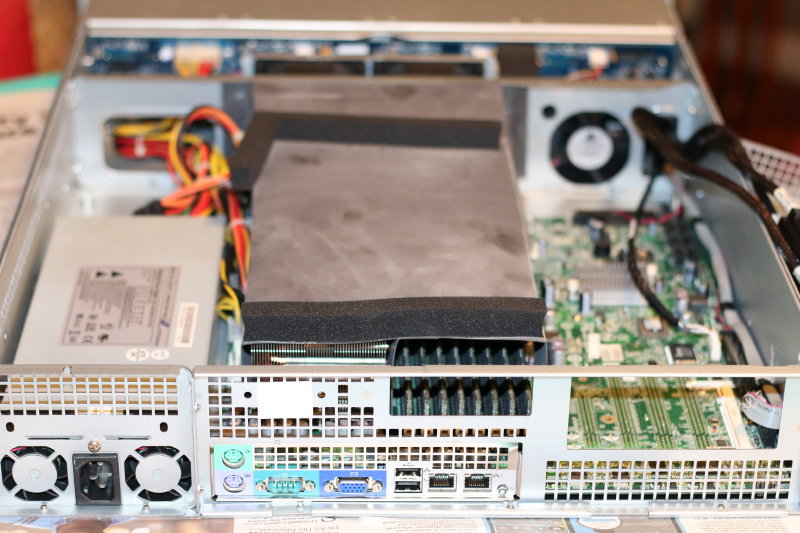
FS-12 looking at the back panel. Note the cowling across the CPUs
As I mentioned, it’s a 2U full length heavy metal box on rails. On the back there are the usual I/O ports: a 9-way RS-232, VGA, two 1Gb Ethernet, two USB2 and a PS/2 keyboard and mouse. The front is taken up by twelve 3.5″ hard drive bays, with the status lights and power button on one of the mounting ears to make room. Unlike other Dell servers, all the connections are on the back, only.
If you want to play with the metalwork, the rear panel is modular and can easily be unscrewed although in practice there’s not much scope for enhancement without changing the motherboard.
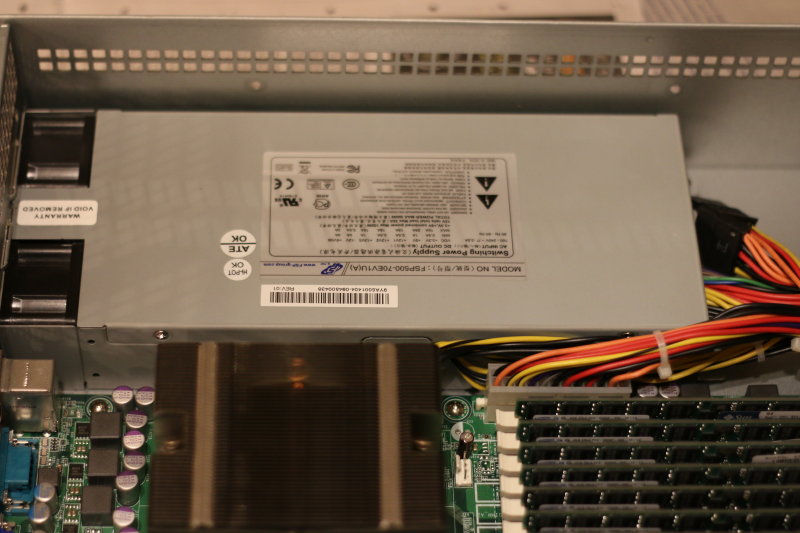
The FS12 has a single 1U PSU
Speaking of metalwork, it comes with a single 1U PSU. There’s space above it for a second, but the back panel behind the PSU bay would need swapping – or removing – if you wanted to add a second. The area above the existing unit is just about the only space left in the box, and I have thought of piling up a load of 2.5″ drives there.
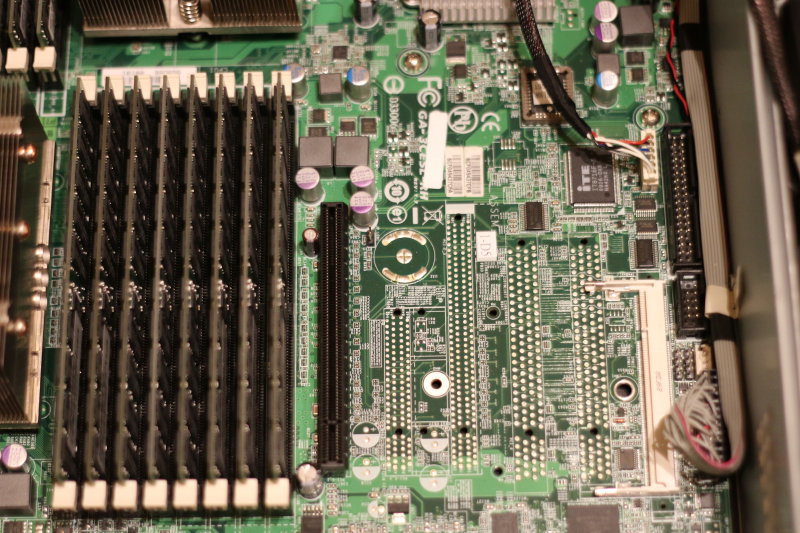
Taking the top off is where the fun starts. Inside there’s large Gigabyte EATX motherboard – a Gigabyte GA-3CESL-RH. All the ones I’ve seen are rev 1.7, which is a custom version but its similar to a rev 1.4. It does have, of all things, a floppy disk controller and an IDE (PATA) connector. More generally usefully, there are two more USB headers, a second RS-232 and six SATA sockets (3Gb). At the back there’s either a BMC module, or a socket where it used to be. If you like DRAC, knock yourself out (you’re likely to be barely concious to begin with). Seriously, this is old DRAC and probably only works with IE 2.0 or something. (You can probably tell I haven’t bothered to try it). The BIOS also allows you to redirect the console to the serial port for remote starting.
The Ethernet ports are Marvel 88E1116 1Gb, and haven’t given me any trouble. The firmware supports PXE, and I’m pleased to say that WoL works with the FreeBSD drives.
Somebody has pinched the slots!
Unfortunately, while the original Gigabyte model sported twin PCI and three PCIe sockets, the connectors are missing from these examples. It’s hard to find anything with a bit of grunt that can also use with your old but interesting PCI cards. It should be possible to rework it by adding the sockets and smoothing caps and sockets; fortunately the SMD decoupling caps are already still there. On the other had, you could find another motherboard with PCI sockets if that’s what you really want.
But grunt is what this box is all about, and there’s plenty of that.
This is board was designed for Opteron Socket-F processors; specifically the 2000 series (Barcelona and Shanghi). The first digit refers to the number of physical CPUs that work together (either 2 or 8), the second is a code for the number of cores (1=1, 2=2, 3=4, 4=6, 5=8). The last two digits are a speed code. It’s not the frequency, it’s the benchmark speed. I’ve heard rumours that some of FS-12s contain six-core CPUs, but I’ve only seen the 2373EE myself. The EE is the low power consumption version. Sweet.
If I could choose any Opeteron Socket-F CPU, the 2373EE is almost as good as it gets. It’s a tad slower than some of the other models running at 2.1GHz , but has significantly lower power and cooling requirements and was one of the last they produced in the 45nm process. It would be possible to change it for a 2.3GHz version, or one with six cores, but otherwise pretty much every other Opteron would be a downgrade. In other words, don’t think you can hot-rod it with a faster processor – you’re unlikely to find a Socket-F CPU anyway. After these, AMD switched to the Bulldozer line in an AM3+ socket.
This isn’t to say the CPU is modern. It does have the AMD virtualisation instructions, so it’s good news if you want to run nested 64-bit operating systems or hypervisors. The thing it lacks that I’d like most are the AES instructions that appeared in Bulldozer onwards. If you’re doing a lot of crypto, this matters. If you’re not, it doesn’t. Naturally, it implements the AMD64 instruction set, as now used by Intel, and all the media processing bit-twiddle stuff if you can use it. AMD has traditionally been at the forefront of processing smarter, whereas Intel goes for brute force and cranks up the clock speed. This is why AMD has, in my opinion, made assembler programming fun again.
Eight very capable Opteron cores: a good start. This generation supported DDR2 ECC RAM, and these boxes have 16 sockets (eight per CPU). They should be able to support 8Gb DIMMs, although I haven’t been able to verify this. Gigabyte’s documentation on similar motherboards is inconclusive as the earlier boards were from an time when 4Gb was all you could get. Again, I haven’t tried this but they are designed to handle 512Mb DIMMs. 1Gb and 4Gb certainly work and these tend to be available with any FS-12 you buy. At one time DDR2 ECC RAM was rather expensive. Not now. It’s much cheaper than DDR3 because, to be blunt, you can’t use it in very much these days.
And this is what makes the FS12 such a good buy: For about £150 you can get an eight-core processor with 64Gb of RAM. Bargain! And that’s before you look at the disk options.
The FS12, like most Dell Servers, is set up to run Windows and as a result requires a separate volume manager, on hardware designed to pretend Windows is looking at a disk. So-called “hardware” RAID. This takes the form of two PERC6/i cards occupying both PCIe cards on a riser. Fine if you want to run Windows or some other lightweight operating system, but PERC cards are about as naff as you can get for anything Unix-like. They work in RAID mode only, hiding the drives from the OS, and these are just a bit to old to be re-flashed in to anything useful.
The drives fit into a front-loading 12-way array with a SAS/SATA backplane. This is built in to the case; you can’t detach it and use it separately. Not without an angle grinder anyway, although if you really wanted to this would be a practical proposition. Note well that this is a backplane; not an expander, enclosure or anything so complex. Some Dell 2U servers like this do have an expander, which takes four SAS channels of SAS on a single cable and expands them to twelve, but this is the 1:1 version. And it’s an old one at that, using SFF-8484 connectors. If you’ve been using SAS for years you may still never have seen an SFF-8484 (AKA 32-pin Multi-lane). These didn’t last long and were quickly replaced with the far more sensible SFF-8487(AKA 36-pin Mini-SAS). However, if you can sort out the cables (as I will explain in a later post), this backplane has possibilities.
But as it stands you get a the PERCs and a 12-slot drive array that’s only good for Windows or Linux. Unless, that is, you remove the backplane and the PERCs and make use of the six 3Gb SATA sockets on the motherboard. You’ll have to leave the drives in place and connect the cables directly back, but how many drives do you need?
There is one unfortunate feature of these boxes that is hard to ignore: the cooling. It’s effective, but when you turn it on it sounds like a jet engine spooling up. And then it gets even louder. There a lot you can do about this and I’m experimenting with options, which I’ll explain in a later post, but in the mean time you need to give everyone ear defenders, or install it in an outbuilding and use a KVM extender. I’ve been knocking around data centres for over twenty years and I’ve never heard one this bad.
The cooling is actually accomplished by five fans. Two are 1U size in the PSU, and are probably as annoying as any other ~40mm fan. The real screamers are two 80mm and one 60mm fan positioned between the drive cage and the motherboard. A cowling directs the one 80mm fan across each CPU and its DIMMs and the 60mm gives airflow over the Northbridge and PCI slots. They all spin really fast – in excess of 10,000rpm, and although they have sense and control wires nothing seems to be adjusting them downwards to the required rate.
My suspicion is that either the customer didn’t care about noise but wanted to keep everything as cool as possible, or that whatever operating system was installed (ESX I suspect) had a custom daemon to control their speed via the SAS backplane. I shall be going in to cooling options later, but note that the motherboard has five monitored and software adjustable fan connectors that are currently not used.
So, in summary, you’re getting a lot for your money if its the kind of thing you want. It’s ideal as a high-performance Unix box with plenty of drive bays (preferably running BSD and ZFS). In this configuration it really shifts. Major bang-per-buck. Another idea I’ve had is using it for a flight simulator. That’s a lot of RAM and processors for the money. If you forego the SAS controllers in the PCIe slots and dump in a decent graphics card and sound board, it’s hard to see what’s could be better (and you get jet engine sound effects without a speaker).
So who should buy one of these? BSD geeks is the obvious answer. With a bit of tweaking they’re a dream. It can build-absolutely-everything in 20-30 minutes. For storage you can put fast SAS drives in and it goes like the wind, even at 3Gb bandwidth per drive. I don’t know if it works with FreeNAS but I can’t see why not – I’m using mostly FreeBSD 11.1 and the generic kernel is fine. And if you want to run a load of weird operating systems (like Windows XP) in VM format, it seems to work very well with the Xen hypervisor and Dom0 under FreeBSD. Or CentOS if you prefer.
So I shall end this review in true PCW style:
Pros:
Cheap
Lots of CPUs,
Lots of RAM
Lots of HD slots
Great for BSD/ZFS or VMs
Cons:
Noisy
no AES-NI
SAS needs upgrading
Limited PCI slots
As I’ve mentioned, the noise and SAS are easy and relatively cheap to fix, and thanks to BitCoin miners, even the PCI slot problem can be sorted. I’ll talk about this in a later post.
It’s no secret that Linux users with good taste have viewed the FreeBSD kernel with envious eyes for many years. A while back Debian distributions started having the FreeBSD kernel as an option instead of the Linux one. (Yes, you read that correctly). But now things seem to have been turned up a notch with UbuntuBSD.
It seems a group of penguinistas regard the Ubuntu world’s adoption of systemd as a step too far, and forked. And rather than keeping with Linux, they’ve opted to dump the whole kernel and bolt the Ubuntu front-end on to FreeBSD instead, getting kernel technology like ZFS and jails but “…keeping the familiarity of Ubuntu”.
Where could this be going? We already have PC-BSD for a “shrink wrapped” graphical desktop environment. Is anyone actually using it? I’m not. I’m sure we’ve all downloaded it out of curiosity, but if I want a Windows PC I’ll have a Windows PC. With BSD I’m more than happy with a command line, thank you very much.
UbuntuBSD could be different. Linux users actually use the graphical desktop, and most can’t cope with a command line. If they were to switch to FreeBSD instead, UbuntuBSD would make a lot of sense.
Although it’s only been around a month, in early beta form, its Sourceforge page is showing a lot of downloads. If I wanted to run a graphical desktop on top of FreeBSD, UbuntuBSD would make a lot of sense over PC-BSD, because I get the vibes that Ubuntu has desktop applications more together.
The project has just launched its own web site too, at www.ubuntubsd.org.
So does this spell the end of PC-BSD, Ubuntu Linux, Windows 10 or none of the above? It’s surely a strong vote against systemd.
Samba Carnival (the real Samba logo is sooo boring)
UNIX permissions can send you around the twist sometimes. You can set them up to do anything, not. Here’s a good case in point…
Imagine you have Samba set up to provide users with a home directory. This is a useful feature; if you log in to the server with the name “fred” you (and only you) will see a network share called “fred”, which contains the files in your UNIX/Linux home directory. This is great for knowledgeable computer types, but is it such a great idea for normal lusers? If you’re running IMAP email it’s going to expose your mail directory, .forward and a load of other files that Windoze users might delete on a whim, and really screw things up.
Is there a Samba option to share home directories but to leave certain subdirectories alone? No. Can you just change the ownership and permissions of the critical files to root and deny write access? No! (Because mail systems require such files to be owned by their user for security reasons). Can you use permission bits or even an ACL? Possibly, but you’ll go insane trying.
A bit of lateral thinking is called for here. Let’s start with the standard section in smb.conf for creating automatic shares for home directories:
[homes]
    comment = Home Directories
    browseable = no
    writable = yes
The “homes” section is special – the name “homes” is reserved to make it so. Basically it auto-creates a share with a name matching the user when someone logs in, so that they can get to their home directory.
First off, you could make it non-writable (i.e. set writable = no). Not much use to use luser, but it does the job of stopping them deleting anything. If read-only access is good enough, it’s an option.
The next idea, if you want it to be useful, is to use the directive “hide dot files” in the definition. This basically returns files beginning in a ‘.’ as “hidden” to Windoze users, hiding the UNIX user configuration files and other stuff you don’t want deleted. Unfortunately the “mail” directory, containing all your loverly IMAP folders is still available for wonton destruction, but you can hide this too by renaming it .mail. All you then need to do is tell your mail server to use the new name. For example, in dovecot.conf, uncomment and edit the line thus:
mail_location = mbox:~/.mail/:INBOX=/var/mail/%u
(Note the ‘.’ added at the front of ~/mail/)
You then have to rename each of the user’s “mail” folders to “.mail”, restart dovecot and the job is done.
Except when you have lusers who have turned on the “Show Hidden Files” option in Windoze, of course. A surprising number seem to think this is a good idea. You could decide that hidden files allows advanced users control of their mail and configuration, and anyone messing with a hidden file can presumably be trusted to know what you’re doing. You could even mess with Windoze policies to stop them doing this (ha!). Or you may take the view that all lusers and dangerous and if there is a way to mess things up, they’ll find it and do it. In this case, here’s Plan B.
The trick is to know that the default path to shares in [homes] is ‘~’, but you can actually override this! For example:
[homes]
    path = /usr/data/flubnutz
    ...
This maps users’ home directories in a single directory called ‘flubnutz’. This is not that useful, and I haven’t even bothered to try it myself. When it becomes interesting is when you can add a macro to the path name. %S is a good one to use because it’s the name as the user who has logged in (the service name). %u, likewise. You can then do stuff like:
[homes]
     path = /usr/samba-files/%S
     ....
This stores the user’s home directory files in a completely different location, in a directory matching their name. If you prefer to keep the user’s account files together (like a sensible UNIX admin) you can use:
[homes]
     comment = Home Directories
     path = /usr/home/%S/samba-files
     browseable = no
     writable = yes<
As you can imagine, this stores their Windows home directory files in a sub-directory to their home directory; one which they can’t escape from. You have to create “~/samba-files” and give them ownership of it for this to work. If you don’t want to use the explicit path, %h/samba-files should do instead.
I’ve written a few scripts to create directories and set permissions, which I might add to this if anyone expresses an interest.
Several years ago I wrote a utility to convert numeric output into human readable format – you know the kind of thing – 12345678 becomes 12M and so on. Although it was very clever in the way it dealt with really big numbers (Zetabytes), and in spite of ZFS having really big numbers as a possibility, no really big numbers have actually come my way.
It was always a dilemma as to whether I should use the same humanize_number() function as most of the FreeBSD utilities, which is limited to 64-bit numbers as its input, or stick with my own rolling conversion. In this release, actually written a couple of years ago, I’ve decided to go for standardisation.
You can download it from here. I’ve moved it (24-10-2021) and it’s not on a prettified page yet, but the file you’re looking for is “hr.tar”.
This should work on most current BSD releases, and quite a few Linux distributions. If you want binaries, leave a note in comments and I’ll see what I can do. Otherwise just download, extract and run make && make install
DESCRIPTION
The hr utility formats numbers taken from the input stream and sends them
to stdout in a format that’s human readable. Specifically, it scales the
number and adds an appropriate suffix (e.g. 1073741824 becomes 1.0M)
The options are as follows:
-b Put a ‘B’ suffix on a number that hasn’t been scaled (for Bytes).
-p Attempt to deal with input fields that have been padded with spaces for formatting purposes.
-wwidth Set the field width to field characters. The default is four
(three digits and a suffix). Widths less than four are not normally useful.
-sbits Shift the number being processed right by bits bits. i.e. multi-
ply by 2^bits. This is useful if the number has already been scaled in to units. For example, if the number is in 512-byte
blocks then -s9 will multiply the output number by 512 before scaling it. If the number was already in Kb use -s10 and so on.
In addition to specifying the number of bits to shift as a number you may also use one of the SI suffixes B, K, M, G, T, P, E
(upper or lower case).
k-ffield Process the number in the numbered field , with fields being numbered from 0 upwards and separated by whitespace.
The hr utility currently uses the humanize() function in System Utilities Library (libutil, -lutil) to format the numbers. This will repeatedly divide the input number by 1024 until it fits in to a width of three digits (plus suffix), unless the width is modified by the -w option. Depending on the number of divisions required it will append a k, M, G, T, P or E suffix as appropriate. If the -b option is specified it will append a ‘B’ if no division is required.
If no file names are specified, hr will get its input from stdin. If ‘-‘ is specified as one of the file names hr will read from stdin at this point.
If you wish to convert more than one field, simply pipe the output from one hr command into another.
By default the first field (i.e. field 0) is converted, if possible, and the output will be four characters wide including the suffix.
If the field being converted contains non-numeral characters they will be passed through unchanged.
Command line options may appear at any point in the line, and will only take effect from that point onwards. This allows different options to apply to different input files. You may cancel an option by prepending it with a ‘-‘. For consistency, you can also set an option explicitly with a ‘+’. Options may also be combined in a string. For example:
hr -b file1 -b- file2
Will add a ‘B’ suffix when processing file1 but cancel it for file2.
hr -bw5f4p file1
Will set the B suffix option, set the output width to 5 characters, process field 4 and remove excess padding from in front of the original digits.
EXAMPLES
To format the output of an ls -l command’s file size use:
ls -l | hr -p -b -f4
This output will be very similar to the output of “ls -lh” using these options. However the -h option isn’t available with the -ls option on the “find” command. You can use this to achieve it:
find. -ls | hr -p -f6
Finally, if you wish to produce a sorted list of directories by size in human format, try:
du -d1 | sort -n | hr -s10
This assumes that the output of du is the disk usage in kilobytes, hence the need for the -s10
DIAGNOSTICS
The hr utility exits 0 on success, and >0 if an error occurs.
Leon Juranic from Croatian security research company Defensecode has written a rather good summary of some of the nasty tricks you can play on UNIX sysadmins by the careful choice of file names and the shell’s glob functionality.
The shell is the UNIX/Linux command line, and globbing is the shell’s wildcard argument expansion. Basically, when you type in a command with a wildcard character in the argument, the shell will expand it into any number of discrete arguments. For example, if you have a directory containing the files test, junk and foo, specifying cp * /somewhere-else will expand to cp test junk foo /somewhere else when it’s run. Go and read a shell tutorial if this is new to you.
Anyway, I’d thought most people knew about this kind of thing but I was probably naïve. Leon Juranic’s straw poll suggests that only 20% of Linux administrators are savvy.
The next alarming thing he points out is as follows: Another interesting attack vector similar to previously described 'chown'
attack is 'chmod'.
Chmod also has --reference option that can be abused to specify arbitrary permissions on files selected with asterisk wildcard.
Chmod manual page (man chmod):
--reference=RFILE
use RFILE's mode instead of MODE values
Oh, er! Imagine what would happen if you created a file named “–reference=myfile”. When the root user ran “chmod 700 *” it’d end up setting the access permissions on everything to match those of “myfile”. chown has the same option, allowing you to take ownership of all the files as well.
It’s funny, but I didn’t remember seeing those options to chmod and chown. So I checked. They don’t actually exist on any UNIX system I’m aware of (including FreeBSD). On closer examination it’s an enhancement of the Linux bash shell, where many a good idea turns out to be a new vulnerability. That said, I know of quite a few people using bash on UNIX.
This doesn’t detract from his main point – people should take care over the consequences of wildcard expansion. The fact that those cool Linux guys didn’t see this one coming proves it.
This kind of stuff is (as he acknowledges) nothing new. One of the UNIX administrators I work with insists on putting a file called “-i” in every directory to stop wild-card file deletes (-i as an argument to rm forces an “Are you sure?” prompt on every file. And then there’s the old chestnut of how to remove a file with a name beginning with a ‘-‘. You can easily create one with: echo test >-example
Come back tomorrow and I’ll tell you how to get rid of it!
Mark Shuttleworth’s software company, Canonical Ltd, trying to raise $32M to build the first 40,000 units of a smart-phone type device that can run Ubuntu Linux. I predict he’s raise the money, and make the handsets. But the idea will tank anyway. Here’s why.
The concept of a ‘phone capable of running a desktop OS is easy to understand. When you want to use the desktop Ubuntu side you plug it in to a real monitor and keyboard – say one at home and one in the office. When you’re on the move it will run Android Linux (for Android is simply Linux with an Android graphical shell). You carry your environment with you, and carry on working wherever you are, assuming you have a monitor and keyboard available. If you run the Ubuntu graphical environment on the move, using the handset’s touch-screen it’s going to be pretty painful.
People investing about £600 will get a ‘phone, if they’re ever made. Is this an investment, or a pre-ordering deal? I think it’s up to you whether you invest enough to get a ‘phone, or buy even more equity as an investment in the future of the device, but I suspect a lot of people will simply be after the latest gadget. Whether £600 is too much for the Penguinistas, remains to be seen.
I think they stand a good chance of raising the money because they’re selling a dream that’s been around in various forms since the dawn of personal computing. One of the early incarnations would be the Apple IIc, which looked a bit like a portable typewriter when cut free from its monitor. With it you could carry your computer back from the office, but it didn’t catch on. Then, came the Tandon Data Pac, a hard disk cartridge. With a cartridge slot in PCs at the locations you needed to work, you could carry the important part of your environment with you. In those days, Microsoft didn’t do anything prevent hard disk transplants, so this was a realistic idea. But it didn’t catch on. Whether there are 40,000 people in the world who still have this dream is a good question.
Now we have laptop/notebook/netbook PCs, which are easy enough to carry in a briefcase if you get the right kind. I have always had the right kind, starting with the Cambridge Z88, moving on to the Sony Vaio and currently the Lenovo S10-3. At around 1Kg, they’re truly portable but although the Lenovo is modern, it was only on the market for a year or two as the 10″ screens format isn’t for well received by the masses. They demands big and fast, and they aren’t really worried about the battery life as long as they look cool. People often ask me “where can I get one of those”, and I tell them. (Currently only Asus and Acer producing a highly portable laptop/netbook). The snag is that when they get one they then “must” run Office 365, or some similar bloatware that a small CPU can’t handle fast.
If you don’t need battery life and the ability to work on the move, but simply want to carry your PC to and from the office, there are small form factor machines also from ASUS and Acer. If you want really small there’s the Fit-PC2 which can actually fit in a pocket. I must admit, I bought one because I thought it was a neat design. These are all Intel based and can run unmodified Windows, and yet they haven’t really caught on either. The Ubuntu Edge will not run Windows; it runs Linux. This means it won’t run Microsoft Office, ever. My experience has shown this is a big problem for a lot of people. There’s nothing wrong with OpenOffice; it’ll work with Microsoft Office files and vice versa. It’s free, whereas Microsoft Office costs and small fortune. Yet in nearly every case, people who I’ve set up with OpenOffice for cost reasons have hankered after the Microsoft version, and most have gone out and bought it (or otherwise acquired it) within a year.
The CPU for the Ubuntu Edge has yet to be announced, but based on size, battery life and heat dissipation it’s very unlikely to be Intel, or even Intel compatible. The only thing that will fit will be RISC, and given the binary nature of Linux distributions it’ll be the second-best choice of ARM. Or will its users be expected to compile everything from source? No. It’ll be an ARM and the models that are capable of running Linux with a GUI at nearly the right speed will still rip through the battery at an alarming rate.
The final nail in its coffin will be the way people currently commute with their computing environment. This comes down to cheap and cheerful thumb drive, if you can find a ubiquitous Windose PC at both ends, or on-line applications such as Google Docs if you’re really serious about it; all your data and applications on every web browser, and impossible to lose at that. If you can find a keyboard and monitor at both ends, you’re probably going to find a web browser anyway so why bother to carrying your stuff on a mobile ‘phone instead? It’s a solution to a problem that has been a “difficult sell” for 30 years, and which has now been solved by the Internet. Okay, this allows you to use an Android ‘phone between PCs, but you could just get an Android ‘phone to plug that gap in your life.