FreeBSD 10.3 hangs on upgrade – beware!

There seems to be a bit of a problem with upgrades to FreeBSD 10.3-RELEASE. Basically, shutdown -r is hanging, requiring you to manually reset the machine (turn it off and on again). This is annoying unless the machine in question happens to be at a data centre on a different continent, in which “annoying” really doesn’t cut it.

This was a known issue with 10.3-STABLE., but it appears to have made it in to -RELEASE too.

I suggest not using freebsd-update. Basically if you follow the official instructions you may need someone on hand to reboot the old fashioned way.

FreeBSD Device Driver Memory Allocation

Yesterday someone asked me how to allocate memory in a FreeBSD device driver. Although not quite as simple as a user-space malloc(), it’s relatively simple – but could I remember the name/parameter order? Not confidently, so I suggested RTFM.

A quick look at the manual doesn’t actually cover it very well. Basically there are special versions of malloc()/free() and they’re have exactly the same names, except the parameters are different. For example, malloc() has two extra parameters; one is the memory type (used for kernal statistics purposes), and one is a flags field, with options whether you’re prepared to wait, or is this a critical situation and using the reserve pool is okay.

For details, see “man 9 malloc”. The ‘9’ is important, as otherwise you’ll get the user-land version in libc. (Incidentally, a read through the libc code should put you off algorithms making wanton use dynamic memory allocation if you weren’t already).

Now what the FreeBSD documentation doesn’t tell you (and something for my to-do list) is how to actually make use of this in a device driver. I had to go back to code I’d written ten years ago to remind me, as I’m just as guilty of copying and tweaking my standard code many times over without really remembering what it does.

But before you go worrying about allocating dynamic memory in a device driver, consider that there’s no reason why you can’t just use static memory – just allocate in BSS in the normal way. Okay, this won’t suit every eventuality but on on most of my simple drivers, which have been to mess with custom hardware for a single process, it’s not actually a problem.

Okay, so you still want to use dynamic? Well to get the kernel versions instead of the the libc ones you need to include instead. As I mentioned above, for some reason using the same names must have seemed like a good idea at the time, but the parameters are different.

The other thing you should be aware of is when about allocating kernel memory you are talking about non-paged. Don’t go crazy.

There is also a memory allocation tracker and statistics dumper available in the libc version (see /etc/malloc.conf), which will help you out if you’ve messed up memory allocation. Don’t expect any such help with the kernel. However, if you compile the kernel with the INVARIANTS option set it will scrub freed memory with 0xdeadc0de, which is handy if you find yourself using unallocated or free kernel RAM. Actually, this is a pretty good idea if you’re writing KLDs anyway, as it stops and does a core dump at the first sign you’ve screwed up any kernel structures.

The documentation in “man 9 malloc” should be enough to cope with the extra parameters; basically the malloc_type. Note that the first parameter to the MALLOC_DEFINE macro is actually a name you make up! By convention it’s in the form M_XXXXX, in upper case.

Also note that when you’re freeing memory it’s not normally zeroed. Therefore someone else using kernel memory might be able to allocate it and read what your driver wrote. Okay, bug deal – if the bad guys are installing kernel modules it’s game anyway. But… consider the bad guys cause a kernel panic and get a core dump.


FreeBSD sysarch kernel panic vulnerability

A bug has been found and fixed in the FreeBSD kernel that would allow someone with malicious intent to crash a running system. It’d be difficult to achieve unless the attacker had console access. However it’s been patched for all supported systems. See here for all the details (which I won’t repeat).

The problem was found by Core Security, and they have provided an excellent write-up here.

But if you want it in plain English:

The sysarch() system call is used to get/set processor-specific stuff. You’re not supposed to call it directly; you’re supposed to call a processor-specific library if you want to do things like that, but you still can call it if you want to. On processors that support memory segments, such as i386,  there is a Local Descriptor Table (LDT) to manage them if you want to mess with specific stuff like that. However, for security reasons, you can only modify the LDT using the sysarch() call, which checks what you’re trying to do and prevents applications from doing anything crazy.

Unfortunately the AMD64 implementation of the code gets the checking wrong. If you use a signed integer it’s always going to be less than another unsigned value, and when it compares the two parameters to make sure that one is less than the other it passes when it shouldn’t, and the rogue parameter causes it to go funky-deux and overwrite a shed load of stuff.

This is in all in:

/sys/amd64/amd64/sys_machdep.c

in the function:

int amd64_set_ldt(td, uap, descs)

The FreeBSD advisory contains a patch for all “supported” versions; but what if you’re using an older one? Using the information from Core it’s easy enough to patch. But what else is affected?

To save you the trouble, I’ve looked back at earlier versions. The problem code definitely exists in the AMD64 versions for 8.x, but isn’t present in any 7.x, as far as I can tell. The system call simply doesn’t exist. On i386 versions, I can’t see any obvious problem with the code.

How worried should we be? If someone breaks in to a system with shell access, they will be able to crash it. However, I think it’s very unlikely that any service is written in such a way that malicious data could cause the necessary parameters to be sent to sysarch() call. In fact, on checking the ports collection, it’s not exactly used all over the place. You’re highly unlikely to be running any application that even makes the call.

How to stop Samba users deleting their home directory and email

Samba Carnival Helsinki summer 2009
Samba Carnival (the real Samba logo is sooo boring)

UNIX permissions can send you around the twist sometimes. You can set them up to do anything, not. Here’s a good case in point…

Imagine you have Samba set up to provide users with a home directory. This is a useful feature; if you log in to the server with the name “fred” you (and only you) will see a network share called “fred”, which contains the files in your UNIX/Linux home directory. This is great for knowledgeable computer types, but is it such a great idea for normal lusers? If you’re running IMAP email it’s going to expose your mail directory, .forward and a load of other files that Windoze users might delete on a whim, and really screw things up.

Is there a Samba option to share home directories but to leave certain subdirectories alone? No. Can you just change the ownership and permissions of the critical files to  root and deny write access? No! (Because mail systems require such files to be owned by their user for security reasons). Can you use permission bits or even an ACL? Possibly, but you’ll go insane trying.

A bit of lateral thinking is called for here. Let’s start with the standard section in smb.conf for creating automatic shares for home directories:

[homes]
    comment = Home Directories
    browseable = no
    writable = yes

The “homes” section is special – the name “homes” is reserved to make it so. Basically it auto-creates a share with a name matching the user when someone logs in, so that they can get to their home directory.

First off, you could make it non-writable (i.e. set writable = no). Not much use to use luser, but it does the job of stopping them deleting anything. If read-only access is good enough, it’s an option.

The next idea, if you want it to be useful, is to use the directive “hide dot files” in the definition. This basically returns files beginning in a ‘.’ as “hidden” to Windoze users, hiding the UNIX user configuration files and other stuff you don’t want deleted. Unfortunately the “mail” directory, containing all your loverly IMAP folders is still available for wonton destruction, but you can hide this too by renaming it .mail. All you then need to do is tell your mail server to use the new name. For example, in dovecot.conf, uncomment and edit the line thus:

mail_location = mbox:~/.mail/:INBOX=/var/mail/%u

(Note the ‘.’ added at the front of ~/mail/)

You then have to rename each of the user’s “mail” folders to “.mail”, restart dovecot and the job is done.

Except when you have lusers who have turned on the “Show Hidden Files” option in Windoze, of course. A surprising number seem to think this is a good idea. You could decide that hidden files allows advanced users control of their mail and configuration, and anyone messing with a hidden file can presumably be trusted to know what you’re doing. You could even mess with Windoze policies to stop them doing this (ha!). Or you may take the view that all lusers and dangerous and if there is a way to mess things up, they’ll find it and do it. In this case, here’s Plan B.

The trick is to know that the default path to shares in [homes] is ‘~’, but you can actually override this! For example:

[homes]
    path = /usr/data/flubnutz
    ...

This  maps users’ home directories in a single directory called ‘flubnutz’. This is not that useful, and I haven’t even bothered to try it myself. When it becomes interesting is when you can add a macro to the path name. %S is a good one to use because it’s the name as the user who has logged in (the service name). %u, likewise. You can then do stuff like:

[homes]
     path = /usr/samba-files/%S
     ....

This stores the user’s home directory files in a completely different location, in a directory matching their name. If you prefer to keep the user’s account files together (like a sensible UNIX admin) you can use:

[homes]
     comment = Home Directories
     path = /usr/home/%S/samba-files
     browseable = no
     writable = yes<

As you can imagine, this stores their Windows home directory files in a sub-directory to their home directory; one which they can’t escape from. You have to create “~/samba-files” and give them ownership of it for this to work. If you don’t want to use the explicit path, %h/samba-files should do instead.

I’ve written a few scripts to create directories and set permissions, which I might add to this if anyone expresses an interest.


FreeBSD on 96-core 64-bit ARMv8

A couple of year’s back I managed to compile and run FreeBSD/Apache/BIND on an ARM-based Raspberry Pi. It was fun, but I have to admit it’s been left on the shelf ever since. A solution waiting for a problem.

Since then the ARM has been a specific target for FreeBSD 11. Do you really need FreeBSD on your smartphone? However much I like BSD, the Linux-based Android does well enough. But wait…

ARM has a 64-bit turbo-nutter-bastard version waiting in the wings, for server use. The ARMv8 is scalable to at least 48 cores per socket and intended to go like the clappers in SMP applications. FreeBSD has long been considered to have the edge over the Linux kernel when it comes to SMP. This is getting interesting.

Cavium-ThunderX
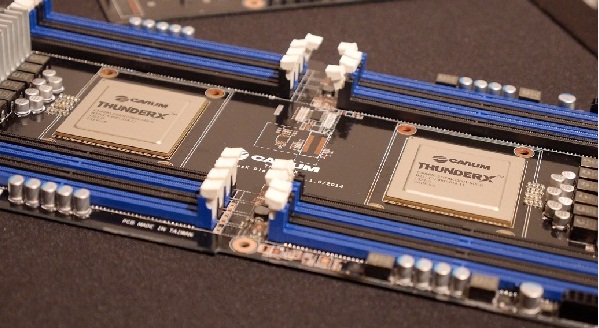
Cavium ThunderX ARMv8 board board.

A team including Semihalf has now got FreeBSD 11 stable running on a twin-CPU monster using the Cavium ThunderX ARM chips, each of which has 48-cores. For details see their blog. With a lot of serious web applications running FreeBSD in preference to the freewheeling Linux, there could be a very ready market for this kind of box.

I would be in danger of being extremely jealous, as my budget for playing with ARM chips doesn’t stretch much past the Raspberry Pi. However, in the 1980’s Atari Research gave me an ATW transputer box with 128 discrete CPUs to help implement an OS on, so I’m still 32-cores ahead. There wasn’t much of a market for the ATW back then, but Cavium could be on to a winner with the approach nearly thirty years later.

Footnote

Does anyone know what happened to the big transputer box prototype that was knocking around the Cambridge office? When the ATW/Abaq was released it was greatly scaled down with no more than 13 transputers, and lacked the glass case with all the flashing lights.

Installing Apache 2.4 with PHP on FreeBSD for Drupal 8. It’s a Nightmare

I’ve been playing about the Drupal 8 (still in Beta) and one of its features is that it needs the latest version of PHP (5.5.9 or later). I have a server I keep for testing the latest whatever, and this includes Apache 2.4. So how hard can it be to compile in PHP?

Actually, it’s not straightforward. Apache 2.4 is fine, but PHP is another matter. First off, installing lang/php55 does not include mod_php for Apache. It’s not that the option to compile it hasn’t been set – the option has gone. With a bit of digging around you can find it elsewhere – in www/mod_php55. Don’t be fooled in to thinking you need to just build and install that though…

You’ll probably end up with stuff like this in your httpd error log:

Call to undefined function session_name()
Call to undefined function hash()

Digging further you’ll find www/php55-session and security/php55-hash in there, and go off to build those too. Then wonder why it still isn’t working.

The clue can be found with this log file error:

PHP Warning: PHP Startup: Unable to load dynamic library '/usr/local/lib/php/20121212-zts/session.so' - Cannot open &quote;/usr/local/lib/php/20121212-zts/session.so&quote; in Unknown on line 0

(NB. The &quote appears in the log file itself!)

Basically, mod_php expects you to compile the ZTS (Zend Thread Safe) version of everything. And why wouldn’t you? Well it turns out that this important option is actually turned off by default so you need to configure the build to include it. Any extensions you’ve compiled up until now will not have been placed in a directory tagged with -zts, which is why it’s looking in the wrong place as shown by the error log.

If you’re reading this following a Google search, you’ve probably already fallen down the Pooh trap. You need to go back to lang/php55 and start again with the correct options. The best way to do this (in case you didn’t know) is:

make clean
make config
make
make install

When you run make config it’ll give you a chance to select ZTS, so do it.

Repeat this for compiling www/mod_php55 and then go back and compile www/php55-session, security/php55-hash and anything else you got wrong the first time, You don’t have the option to configured them, but they must be compiled again once the core of PHP has been compiled using ZTS.

Incidentally, if you haven’t had this pain before, you will probably need to switch to using the new pkg system if you haven’t already. Trying to build without it, it’ll put up a curt little note about it and go in to sulk mode until you do. Unfortunately, on an older FreeBSD, any attempt to compile this will result in an O_CLOEXEC symbol undefined error in pkg.c. This is actually a flag to the open() kernel function that was added to POSIX in 2008. What it means is that if your process subsequently makes exec call, the file handle will be automatically closed. It saves leaking fds if your execution path goes awry. But what’s the solution?

Well, if you’re using an older version of the kernel then it won’t support O_CLOEXEC anyway, so my fix is to delete it from the source and try again. It only appears once, and if the code is so sloppy that it doesn’t close the handle, it’s not the end of the world. The official answer is, of course, to upgrade your kernel.

If you are running Drupal 8, here’s a complete list of the ports you’ll need to compile:

lang/php55 (select ZTS option in the configuration dialogue)
www/mod_php55 (select ZTS option in the configuration dialogue)
www/php55-session
security/php55-hash
security/php55-filter
devel/php55-json
devel/php55-tokenizer (for Drupal 8)
databases/php55-pdo
databases/php55-pdo_mysql
textproc/php55-ctype
textproc/php55-dom
textproc/php55-simplexml
graphics/php55-gd
converters/php55-mbstring (not tested during setup)

All good fun! This relates to Drupal 8.0.0 RC1 – it may be different with the final release, of course.

Static IP addresses for network printers

I had a call a couple of days ago from a company planning to sell some networked printers to a user site I oversee. The first I heard about it was a form from the supplier asking a few questions about the network; questions that suggested they expect to find a Microsoft small office plug and play kind of LAN. Time to get on the blower.

The question that worried me most was their demand for a static IP address, subnet mask and so on. Not happening; everything is on DHCP and managed centrally, for good reason. Kit like printers needs to auto-configure to the correct subnet depending on where it’s plugged in, and users will expect it to work. So why is anyone thinking of hard configuring the IP address at the printer?

The simple answer is that it’s the easy way, and in the bad old days, it was the norm. It may even be necessary on a network controlled by a crude domestic router with a DHCP server that can be configured to either be “on” or “off”. If you’re using from a Windows PC you need to set up a virtual printer port, and to do this you must supply the IP address of the physical printer, so just set a static one and plug this in when the driver configurations asks for it. Simple. If you’re Fred in a Shed, with two PCs and one shared printer.

If you’re playing with the big boys, you’re creating a world of pain by hard configuring printers, as you have to manually reconfigure each printer and EVERY PC in the company when you move it around on the LAN.

So what should you be doing instead? If your company (and/or its budget) is large enough you can get a point+click print server to manage the whole lot. I’ve found these a bit vendor-specific, and only really do it if you have a Wizard that understands all your printers and the LAN. Otherwise you’re going to have to get your hands dirty anyway. So for a SME, with a savvie IT guy, there are two simple approaches that achieve the results you need without the fuss: NetBIOS and DNS. Leave the network printers stand-alone, as nature intended.

The easy option with Windows PCs is to use the NetBIOS name. Most fancy printers have one, and it’s usually programmable if you dig around in the menus. It can sometimes be hard to recognise as it defaults to something akin to gibberish. You also have to enable NetBIOS on the printer if necessary, although in my experience most enable every protocol they know about by default. Once done, just use the NetBIOS name instead of he IP address in the virtual printer driver and you’re away – nothing more to do. The down side is that not everything understands NetBIOS/SMB/CFIS, although most UNIX systems can resolve them using SAMBA if necessary. And to be honest, Microsoft’s self-configuring peer-to-peer networking has always been a bit hit and miss. (Luser: “I can’t see xxxx!”)

A more complete solution is to use DNS. This obviously means you’re going to need a local DNS server, and also a proper DHCP server. If you want to get clever, have the DHCP server update the DNS with the host name associated with the IP addresses it’s just given out. This works in theory, but good luck in practice. However, there’s an easier way that is almost as good.

All you need to do is configure the DHCP server to issue fixed IP addresses when it gets a request from the MAC addresses of each of your printers. On GUI based DHCP servers this is often called “Bind IP to MAC” or similar. On dhcpd you just need a specific entry in the config file, such as:

host bigprinter1 {
hardware ethernet 11:22:33:44:55:66;
fixed-address 192.168.1.123;
}

Okay, this is giving it a fixed address, but all the fixed addresses are found in one file, along with the other network configuration stuff, and you don’t need to trail around to each printer (or even visit the site) to change it. And besides, this is never referenced in the printer or any of the workstations; they use a symbolic name.

To achieve this you need to add an A record for the printer at this address in your DNS zone file. e.g.:

bigprinter1 A 192.168.1.123

You don’t even need to use on-site DNS if you have a reliable Internet connection (or your domestic router has a caching DNS relay). Just go to the easy peasy web configuration thingy for your outside-hosted domain and add it. The fact that its a local, non-routing IP address won’t matter – people outside the building just won’t get what they’re expecting if they try to use it, but they shouldn’t be doing this anyway.

As a final point, it’s safer to make sure the NetBIOS name and the DNS hostname match, but its not essential.

Whichever method you use for the name lookup, just plug the NetBIOS name or DNS hostname in to the printer driver instead of a fixed IP address and you’ll never have to physically mess with the printer again – wherever the users choose to plug it in.

Problems receiving mail from GMail – STARTTLS is a bad idea

Gmail Fail

Note: You may wish to read this follow-up article, which contains a solution.

A couple of weeks ago, users started complaining that people using GMAIL (and possibly iCloud) were having their emails bounced back to them from my servers. This is odd – most complaints on the Internet are from users of dodgy hosting companies having their mail rejected by GMail as likely spam. But I haven’t blacklisted Google, and all other mail is working, so they must have been mistaken.

But as soon as I could, I tried it for myself. And sure enough, a bounce came back. The relevent bit is:

Technical details of temporary failure:
TLS Negotiation failed: generic::failed_precondition:
               starttls error (0): protocol error

On fishing around in Sendmail logs, I found evidence that this has been going on all over the place:

sm-mta[84848]: STARTTLS=server, error: accept failed=-1, SSL_error=1, 
               errno=0, retry=-1, relay=mail-qg0-f50.google.com [209.85.192.50]
sm-mta[84848]: STARTTLS=server: 84848:error:1408A0C1:SSL
               routines:SSL3_GET_CLIENT_HELLO:no shared cipher:/usr/src/secure
               /lib/libssl/../../../crypto/openssl/ssl/s3_srvr.c:1073:
sm-mta[84848]: t7QJXCPI084848: mail-qg0-f50.google.com [209.85.192.50] did
               not issue MAIL/EXPN/VRFY/ETRN during connection to MTA

Oh my! The STARTTLS stuff isn’t working because there’s no shared cypher! Hang on a minute, there isn’t supposed to be. Who told Google they could use STARTTLS on port 25. It’d be neat if it worked, but it’s not configured – at least not with a certificate from a public CA. It actually works just fine if you are cool with self-signed (private) certificates. So what is Google playing at?

In the wake of Edward Snowden, people have started worrying about this kind of thing, so companies like Google are trying to be seen doing something about it, and encrypting mail might seem like a good idea. Unfortunately STARTTLS is a bad idea. The rationale behind STARTTLS was to add encryption to a previously unencrypted port’s traffic. If the sender issued a STARTTLS as part of the protocol it could switch in to TLS mode if it knew how; otherwise it would just work as normal. The IETF was very keen on this in the late 1990’s as an easy fix, citing all sorts of iffy reasons, generally to do with having two ports; one standard and one encrypted. They thought it would be confusing, requiring different URLs and not allow for opportunistic automatic encryption of the kind Google seems to be attempting.

As far as I’m concerned, this is rubbish. Having clearly defined encrypted and unencrypted ports means you know where you are. It either is or it isn’t. If you say something must be encrypted, turn off the unencrypted port. STARTTLS allows a fall-back to plain text if you specify the clear text port; and if you have a man-in-the-middle you’ll never know that the STARTTLS was stripped from the negotiations. It opens up a vulnerability that need not be there, all for the sake of saving a port. And time is on my side in this argument. Since 1999 the implementation of encrypted ports has really taken off, with https, smtps (in spite of 465 being rescinded), imaps – you name it – all servers and clients support it and you know where you are.

So what’s this sudden clamouring for the insecure STARTTLS? Naivety on the part of the large internet companies, or a plot to make people think their email traffic is now safe from snoopers when its not?

I’ve reported this problem and I await an answer from Google, but my best guess is that they’re speculatively using STARTTLS, and then barfing and throwing their toys from the pram when it doesn’t work because the verify can’t be done. Having thought about it, I’m okay with the idea of trying STARTTLS as long as you don’t mind about the CA used for the certificate; and if you can’t negotiate a TLS link, go back to plain text. In many ways it’d be better to use the well known port 465 for TLS, and if it can’t be opened, go to plain text on 25. Except there’s no guarantee that port 465 is on the same server as port 25, and it’s normally configured to require SASL authentication. As everyone knows, apart from Google it seems, assumption is the mother of all foul-ups.

Encryption is a good idea, but making assumptions about Port 25 being anything other that straight SMTP is asking for trouble.


Problems with Thunderbird 38.0.1 and SSL

Dead Thunderbird
Version 38.0.1 of Thunderbird is an ex-mail client. It has ceased to be.

Thunderbird used to be my mail client of choice, but suddenly I’m not so sure! The latest update on the release channel (version 38.0.1) seems to have broken completely when using self-signed certificates for SSL.

A self-signed certificate makes sense when you know you can trust it; otherwise you get a signing authority you do trust to verify your certificate (for loadsamoney). If you’re talking to your own servers, there’s not point in doing this as there are other ways to check you’re talking to who you think you are. Thunderbird used to warn you that it didn’t recognise a self-signed certificate the first time it saw it, but if you told it to go ahead anyway it would add it to the trusted list and go on encrypting your data for you quite happily.

Since “upgrading” to version 38 it suddenly stopped working. No more email. No more sending email. It just failed silently (that’s bad, for a start), the only clue was that I couldn’t send an email or copy it to the drafts folder.

On examining the logs at the server end I found stuff like this:

Jul  7 23:17:54  dovecot: imap-login: Disconnected (no auth attempts):
    rip=###.###.###.###, lip=###.###.###.###, TLS handshaking: SSL_accept() 
    failed: error:1408A0C1:SSL routines:SSL3_GET_CLIENT_HELLO:no shared cipher

Suspicious! So I turned off SSL in Thunderbird and it all worked again. This is NOT a sensible solution. Unfortunately, I have yet to solve this one, other to simply not upgrade Thunderbird beyond 31.7.

Fortunately, you can still download the previous non-beta version from here, (assuming Mozilla don’t move it). You actually want 31.7.0, because the intervening releases were betas, and 31.7.0 is as recent as May 2015 so it’s not ancient. Just navigate around the site you don’t want the English version. Simply install it everything comes back the way it used to be, or at least it did for me.


Update 15-Jul-2015:

It appears that Thunderbird may have decided not to accept TLS with less that 1024-bit DH keys without telling anyone. Even if they had mentioned it, there’s not a lot users can do with it. This means that if you’re using a 512-bit key (which is considered export-grade) then it’s going to refuse to talk. Worse than that, it doesn’t pop up a message saying WHY it’s not going to talk. It’s just going to fail the connection. Presumably, as my friend Graham put it, this indicates that the Thunderbird open-source developers are hoping to get a job with Apple.

I hope this nonsense will be resolved in 38.1! In the mean time, turn off auto-update.

Update 30-Jul-2015:

I’ve now updated the server certificates being in-date (which doesn’t actually matter), and made sure they were 1024-bit (which they were) and apart from upsetting everyone who has had to accept the new certificate, Thunderbird still barfs.

Update 15-Aug-2015:

It get’s worse – there has been an update to the 31.x branch to 31.8.0, and this has the same problem. Use the link above and make sure you’re using 31.7.0


FreeBSD hr utility – human readable number filter (man page)

Several years ago I wrote a utility to convert numeric output into human readable format – you know the kind of thing – 12345678 becomes 12M and so on. Although it was very clever in the way it dealt with really big numbers (Zetabytes), and in spite of ZFS having really big numbers as a possibility, no really big numbers have actually come my way.

It was always a dilemma as to whether I should use the same humanize_number() function as most of the FreeBSD utilities, which is limited to 64-bit numbers as its input, or stick with my own rolling conversion. In this release, actually written a couple of years ago, I’ve decided to go for standardisation.

You can download it from  here. I’ve moved it (24-10-2021) and it’s not on a prettified page yet, but the file you’re looking for is “hr.tar”.

This should work on most current BSD releases, and quite a few Linux distributions. If you want binaries, leave a note in comments and I’ll see what I can do. Otherwise just download, extract and run make && make install


Extracted from the man page:

NAME

hr — Format numbers in human-readable form

SYNOPSIS

hr [-b] [-p] [-ffield] [-sbits] [-wwidth] [file ...]

DESCRIPTION
The hr utility formats numbers taken from the input stream and sends them
to stdout in a format that’s human readable. Specifically, it scales the
number and adds an appropriate suffix (e.g. 1073741824 becomes 1.0M)

The options are as follows:

-b      Put a ‘B’ suffix on a number that hasn’t been scaled (for Bytes).

-p     Attempt to deal with input fields that have been padded with spaces for formatting purposes.

-wwidth      Set the field width to field characters. The default is four
(three digits and a suffix). Widths less than four are not normally useful.

-sbits  Shift the number being processed right by bits bits. i.e. multi-
ply by 2^bits. This is useful if the number has already been scaled in to units. For example, if the number is in 512-byte
blocks then -s9 will multiply the output number by 512 before scaling it. If the number was already in Kb use -s10 and so on.
In addition to specifying the number of bits to shift as a number you may also use one of the SI suffixes B, K, M, G, T, P, E
(upper or lower case).

k-ffield      Process the number in the numbered field , with fields being numbered from 0 upwards and separated by whitespace.

The hr utility currently uses the humanize() function in System Utilities Library (libutil, -lutil) to format the numbers.  This will repeatedly divide the input number by 1024 until it fits in to a width of three digits (plus suffix), unless the width is modified by the -w option. Depending on the number of divisions required it will append a k, M, G, T, P or E suffix as appropriate. If the -b option is specified it will append a ‘B’ if no division is required.

If no file names are specified, hr will get its input from stdin. If ‘-‘ is specified as one of the file names hr will read from stdin at this point.

If you wish to convert more than one field, simply pipe the output from one hr command into another.

By default the first field (i.e. field 0) is converted, if possible, and the output will be four characters wide including the suffix.

If the field being converted contains non-numeral characters they will be passed through unchanged.

Command line options may appear at any point in the line, and will only take effect from that point onwards. This allows different options to apply to different input files. You may cancel an option by prepending it with a ‘-‘. For consistency, you can also set an option explicitly with a ‘+’.  Options may also be combined in a string. For example:

hr -b file1 -b- file2

Will add a ‘B’ suffix when processing file1 but cancel it for file2.

hr -bw5f4p file1

Will set the B suffix option, set the output width to 5 characters, process field 4 and remove excess padding from in front of the original  digits.

EXAMPLES
To format the output of an ls -l command’s file size use:

ls -l | hr -p -b -f4

This output will be very similar to the output of “ls -lh” using these options. However the -h option isn’t available with the -ls option on the “find” command. You can use this to achieve it:

find. -ls | hr -p -f6

Finally, if you wish to produce a sorted list of directories by size in human format, try:

du -d1 | sort -n | hr -s10

This assumes that the output of du is the disk usage in kilobytes, hence the need for the -s10

DIAGNOSTICS
The hr utility exits 0 on success, and >0 if an error occurs.